


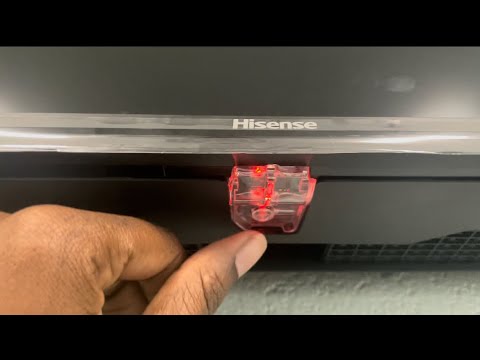
Modern televisions are designed to work mainly with remote controls, but many users still need to know where the manual buttons are located. If you have lost your remote, the batteries are dead, or your TV is not responding properly, manual buttons can become extremely important. Many people search for “where are the manual buttons on a Hisense TV” because the buttons are often hidden or placed in unusual spots depending on the TV model.
Hisense TVs are popular for their affordable pricing, smart features, and sleek designs. However, one common issue owners face is locating the physical control buttons. Unlike older televisions that had large visible buttons on the front panel, newer Hisense TVs keep these controls hidden to maintain a clean and modern appearance. This article will explain everything you need to know about finding and using the manual buttons on a Hisense TV.
Why Manual Buttons on a Hisense TV Matter
Manual buttons are essential when your remote control stops working or gets misplaced. These buttons allow users to perform basic functions such as powering the TV on and off, adjusting volume, changing channels, and accessing menus. Even though smart TVs rely heavily on remote controls and apps, the manual buttons provide a reliable backup option.
Another reason manual buttons matter is troubleshooting. Sometimes a Hisense TV may freeze or fail to respond to remote commands. In such situations, using the physical buttons can help restart the device or navigate settings without needing additional accessories.
For households with children or elderly family members, knowing where the manual buttons are located can also make TV operation easier during emergencies.
Common Locations of Manual Buttons on a Hisense TV
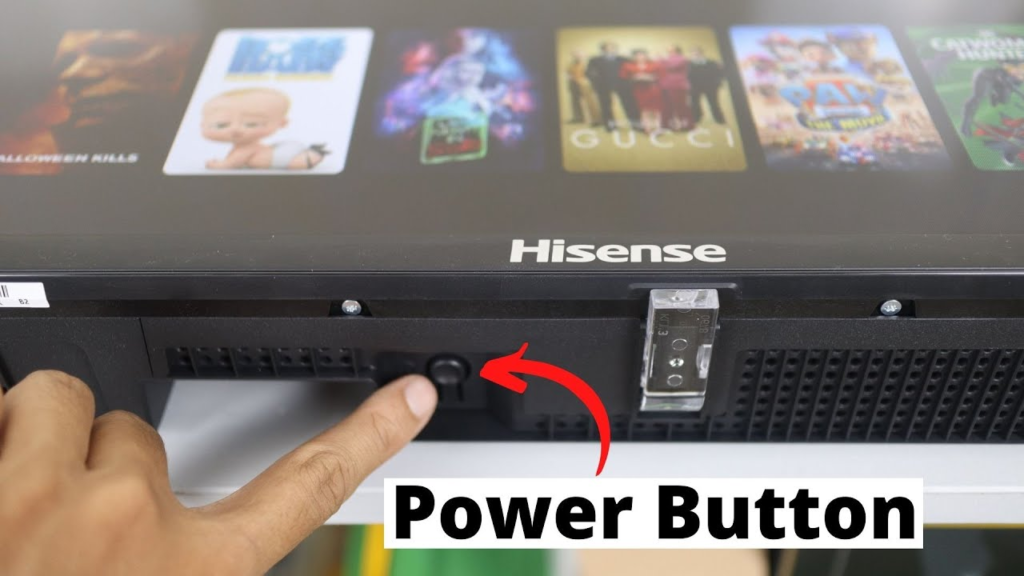
If you are wondering where are the manual buttons on a Hisense TV, the answer depends on the model and manufacturing year. Hisense places the buttons in different areas to preserve the TV’s slim design. Below are the most common locations.
Under the Bottom Bezel
The most common location for Hisense TV manual buttons is underneath the bottom bezel. Many models have a small joystick-style button or a series of tiny buttons directly under the center logo.
To find them, gently run your fingers beneath the lower edge of the TV. You may feel a small protruding button that controls multiple functions. Pressing it once usually powers the TV on, while moving it left, right, up, or down may adjust settings.
This hidden design prevents the front of the TV from looking cluttered while still allowing users to access essential controls.
Buttons on the Back Right Side
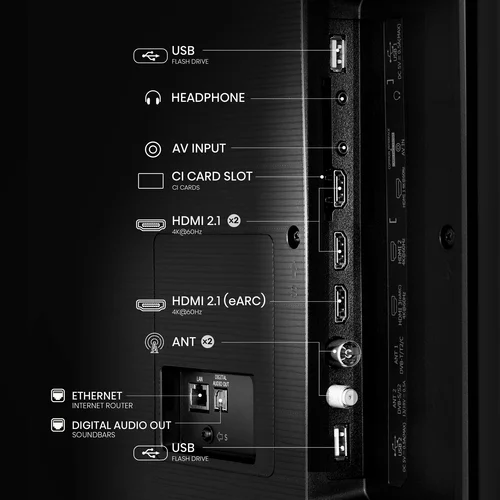
Some Hisense TV models place manual buttons on the back right-hand side of the television. They are often positioned vertically and may include power, volume, channel, input, and menu buttons.
If you cannot find buttons underneath the TV, carefully check the rear panel on the right side. Use a flashlight if necessary because the labels may be difficult to see.
This placement is especially common on older Hisense LED TVs and certain Roku TV versions.
Buttons on the Back Left Side
Although less common, some Hisense TVs place manual controls on the left rear side. Manufacturers occasionally switch positions depending on internal hardware layout and screen size.
To locate them, stand behind the TV and inspect both sides carefully. Look for small tactile buttons or a joystick control.
Single Joystick Button Design
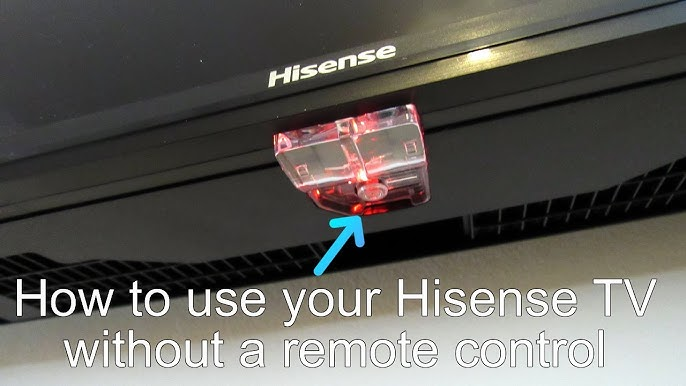
Many modern Hisense smart TVs now use a single joystick-style control instead of multiple buttons. This design simplifies the appearance and saves space.
The joystick button usually performs several tasks:
- Press once to power on the TV
- Hold to power off the TV
- Move left or right to adjust volume
- Move up or down to change channels
- Press and hold for menu access
This multifunction control is very convenient once you understand how it works.
How to Turn On a Hisense TV Without a Remote
If your remote is unavailable, you can still turn on the television using manual controls. First, locate the power button using the methods described earlier. Once found, press the button once firmly.
Most Hisense TVs will immediately power on. If nothing happens, check whether the TV is plugged into a working power outlet. You should also confirm that the power cable is securely connected.
Some models require holding the button for a few seconds instead of tapping it quickly.
Adjusting Volume and Channels Manually
After finding the manual buttons, you can use them for basic navigation. Older models with separate buttons usually have clear labels for volume and channel controls.
For joystick models, moving the button horizontally adjusts the volume while moving vertically changes channels.
Although manual navigation is slower than using a remote control, it is helpful in temporary situations.
Accessing Input and Menu Settings
One important feature of Hisense TV manual buttons is the ability to switch inputs. If you want to connect a gaming console, streaming device, or cable box but do not have the remote, manual controls can still help.
Pressing the menu or input button allows you to cycle through HDMI ports and settings menus. On joystick models, pressing and holding the center button may open the input selection menu.
This feature is useful for troubleshooting display problems or setting up external devices.
Why Hisense Hides the Manual Buttons
Many users become frustrated because they cannot immediately see the buttons on their TV. However, manufacturers intentionally hide them for design reasons.
Modern smart TVs focus on slim bezels and minimalist aesthetics. Visible buttons can make the television look outdated. By hiding the controls underneath or behind the panel, Hisense creates a cleaner and more premium appearance.
Another reason is accidental button presses. Hidden controls reduce the chances of children or pets unintentionally changing settings.
What to Do If You Cannot Find the Buttons
If you still cannot locate the manual buttons, there are several solutions you can try.
Check the User Manual
Every Hisense TV includes a user manual with diagrams showing button placement. If you lost the printed guide, you can often download a digital version online using your TV model number.
Use a Flashlight
The buttons may blend into the TV casing because they are usually black and very small. A flashlight can make them easier to spot.
Feel Around the Edges
Sometimes the controls are almost invisible but can be identified by touch. Carefully move your fingers along the bottom and rear edges of the TV.
Search by Model Number
Different Hisense TV series have unique layouts. Searching your exact model number online can provide pictures and instructions.
Using the Hisense TV Remote App
If you cannot find or use the manual buttons, another solution is the Hisense remote control app. Many Hisense smart TVs support mobile apps that allow smartphones to function as remotes.
You simply connect the TV and phone to the same Wi-Fi network. Once connected, the app can control power, volume, channels, and streaming apps.
This method is especially convenient when the physical remote is missing.
Common Problems With Manual Buttons
Although manual buttons are helpful, they can sometimes malfunction.
Buttons Not Responding
Dust, dirt, or internal wear may prevent buttons from working properly. Cleaning around the button area gently with compressed air can sometimes help.
Stuck Buttons
If a button becomes stuck, the TV may continuously change settings or fail to respond. Carefully pressing the button multiple times may release it.
Broken Joystick Control
Single-button joystick systems can wear out over time. If damaged, professional repair may be necessary.
Tips for Keeping Your Hisense TV Easy to Use
To avoid future issues, consider these simple tips:
- Keep spare remote batteries available
- Download the Hisense remote app as a backup
- Learn your TV’s button layout before emergencies occur
- Avoid pressing buttons too forcefully
- Store your remote in a consistent place
These habits can make TV usage much easier and reduce frustration.
Conclusion
If you have been searching for “where are the manual buttons on a Hisense TV,” the good news is that every Hisense TV includes physical controls somewhere on the device. In most cases, the buttons are hidden underneath the bottom bezel or located on the rear side panels. Some newer models use a single joystick-style button that controls multiple functions.
Knowing where these controls are located can help you turn on the TV, adjust settings, switch inputs, and troubleshoot problems even without a remote control. While hidden buttons may initially seem confusing, they become easy to use once you know where to look.
By understanding your Hisense TV’s manual controls, you can avoid unnecessary stress and continue enjoying your television even when your remote is unavailable.
Frequently Asked Questions
Where are the manual buttons on a Hisense TV usually located?
They are commonly found under the bottom bezel or on the back side of the TV.
Can I turn on a Hisense TV without a remote?
Yes, you can use the physical power button or joystick control on the TV.
Do all Hisense TVs have manual buttons?
Yes, all Hisense TVs include some form of manual control buttons.
Why are the buttons hidden on Hisense TVs?
They are hidden to maintain a modern and clean TV design.
What should I do if the manual buttons do not work?
Try cleaning around the buttons, checking power connections, or using the Hisense remote app.